Secured Commands: the password of the protected commands (see Protected commands).
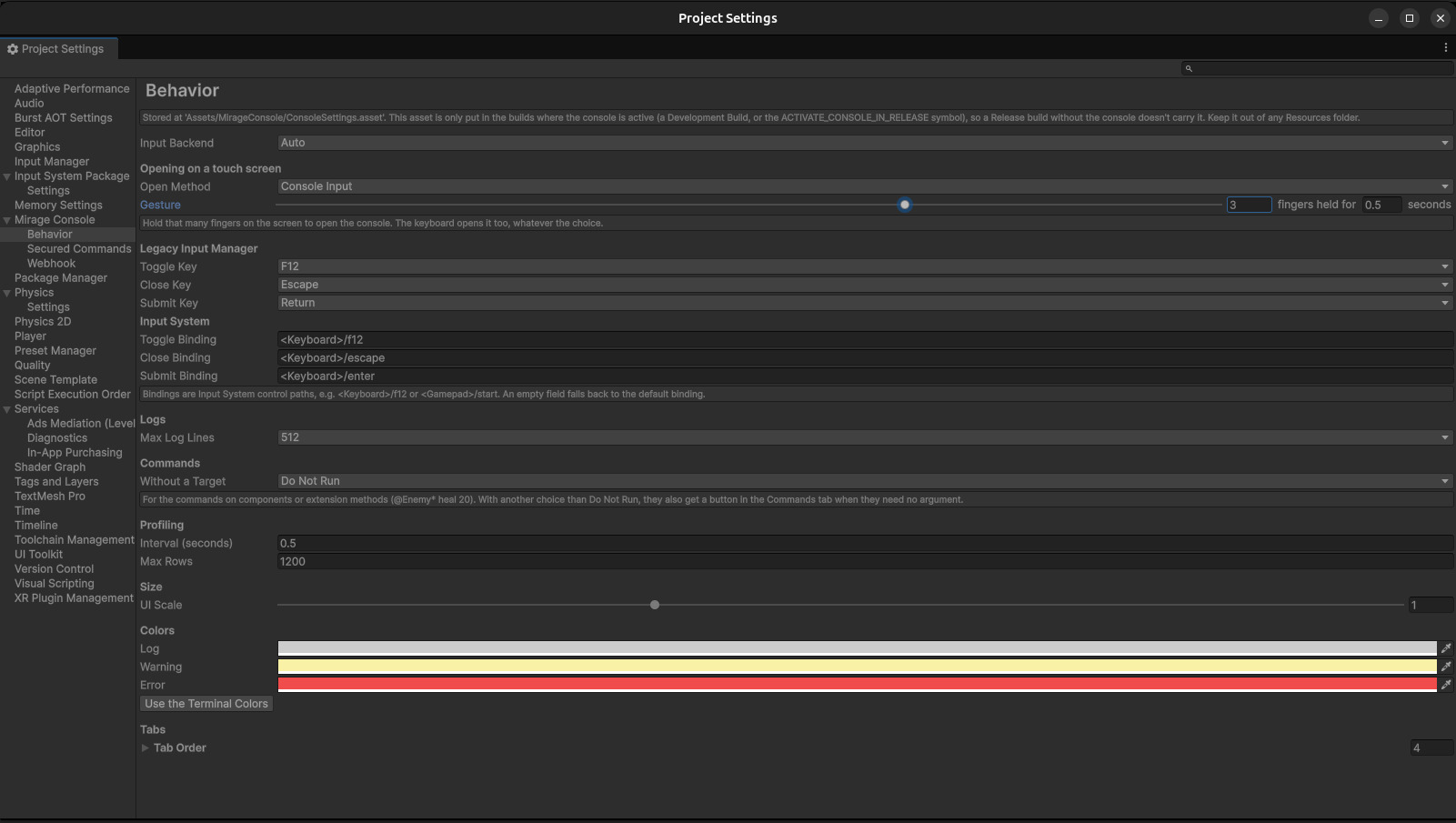
The Behavior page of the settings.
The settings asset
The settings are saved in a ConsoleSettings asset, created the first time you open one of the pages,
at Assets/MirageConsole/ConsoleSettings.asset. Without it, the console uses the defaults below.
You can also create one with Assets > Create > Mirage Console > Console Settings, anywhere except in a Resources folder.
Keep a single one. With several, the console uses the one at the default path, otherwise the first it finds.
The asset is only added to the builds where the console is active, never to the others: see Builds. Don't reference it from a scene or a prefab: Unity would then put it in every build.
Input
Setting
Default
What it does
Input Backend
Auto
Which input system the console reads its keys from. Auto picks the Legacy Input Manager when Player Settings > Active Input Handling enables it, the Input System package otherwise. You can force Legacy Input Manager or Input System Package.
Toggle Key
F12
Legacy Input Manager: the key that opens and closes the console
Close Key
Escape
Legacy Input Manager: a key that only closes it
Submit Key
Return
Legacy Input Manager: runs the text of the input field while the console is closed
Toggle Binding
<Keyboard>/f12
Input System: the control that opens and closes the console, as a control path, e.g. <Gamepad>/start
Close Binding
<Keyboard>/escape
Input System: a control that only closes it
Submit Binding
<Keyboard>/enter
Input System: runs the text of the input field while the console is closed
The page shows the fields of the input system in use. An empty binding falls back to its default. If the Input
System package isn't installed, the page says so, and the console uses the Legacy Input Manager.
Opening on a touch screen
Setting
Default
What it does
Open Method
Console Input
Console Input: a touch gesture opens the console. Button: no gesture; your own button calls MirageConsole.Open() (see Scripting API). The keyboard opens it in both cases.
Gesture
3 fingers held for 0.5 seconds
The gesture of Console Input: how many fingers (1 to 4), held on the screen for how long. With a single finger, any long press in your game opens the console: two or more is safer.
Logs
Setting
Default
What it does
Max Log Lines
512
Lines kept in each log (CLI and All Messages); the oldest go first
Commands
Setting
Default
What it does
Without a Target
Do Not Run
What a command that runs on objects does when it is typed without @name: Do Not Run asks for a target; First In Hierarchy runs it on the first active object that has it, in the order of the Hierarchy window; All Active runs it on every active one, as @*. See Without a target.
Rows kept by the recording; the oldest go first. 1,200 rows are ten minutes at half a second.
Size
Setting
Default
What it does
UI Scale
1
How big the console is drawn, from 0.5 to 2, on top of the size it takes by itself
The console sizes itself for the screen it is on. On a desktop it keeps its size. On a phone or a tablet it is scaled
up, so that its text is as big as on a desktop screen, but never so much that it doesn't fit: at least 480 by 360 of
its own pixels, enough for the tab bar across a phone held upright. It sizes itself again when the screen turns, and
stays clear of the notch, the rounded corners and the gesture bar (the safe area). UI Scale makes it
bigger or smaller than that; set-console-scale does it for a session, on the device, without changing the settings. On a narrow screen, the tabs shrink and their names are cut short (…); the × stays.
Colors
Setting
Default
What it does
Log
light gray
The color of a regular message
Warning
pale yellow
The color of a warning
Error
red
The color of an error, an exception or a failed assertion
Use the Terminal Colors
Puts the three default colors back
Tabs
Tab Order sets the order of the tabs, left to right: drag the entries to reorder them. Remove a
tab from the list to hide it entirely. Default: CLI, All Messages, Commands, Profiling.
Other pages
Webhook: the URL, its authentication header and the payload.