Webhook
Send logs to Slack, Discord, or your own server or workflow.
A webhook is a URL that receives the logs you send. It can be a Slack or Discord channel, or your own server or workflow (n8n, Make...). Nothing is ever sent unless you set a URL and send.
Setting it up
- Get a webhook URL: a Slack incoming webhook, a Discord channel's webhook (Edit Channel > Integrations > Webhooks), or the URL of your own endpoint.
- Open Edit > Project Settings > Mirage Console > Webhook and paste it in URL.
- Choose the Payload that matches the service.
- Press Play, select a few lines, and press Send.

| Setting | Default | What it does |
|---|---|---|
| URL | empty | Where the logs go. Empty: no Send button, nothing can be sent. Copying still works. |
| Payload | PlainText | The format of the request: PlainText, File, Json, Discord or Slack |
| Secure with Auth Header | off | Adds a header to every request, to authenticate it |
| Auth Header Name / Value | empty | The header: X-API-Key and your key, or Authorization and Bearer your-token |
Payloads
| Payload | For | What is sent |
|---|---|---|
Slack | A Slack incoming webhook | A message: the project as a title, your message, where the log comes from, and the log in a code block |
Discord | A Discord webhook | A message: the project as a title, your message, where the log comes from, and the log attached as a file |
Json | Your server or a workflow that reads JSON | The fields, the counts per severity, every line with its time, severity and tags, and the log |
PlainText | Your server or a workflow | A form: the fields that have a value, and the log in log |
File | Your server or a workflow | A form: the fields that have a value, and the log as a .txt file in file |
A file sent is named after when the log was taken: console-log-2026-09-27-14-03.txt, or
profiling-2026-09-27-14-03.csv for a Profiling recording.
Slack

- Create an incoming webhook for your channel and paste its URL.
- The log is sent whole, in one code block, up to 60,000 characters (about 700 lines). A longer selection isn't sent: the error says to select fewer lines.
- The notification says how many lines were sent and from where.
- What the log and the message hold stays text:
<!here>notifies nobody, and links get no preview.
Discord
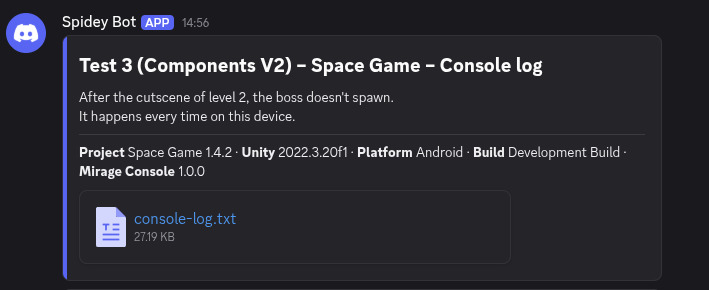
- Create a webhook in the channel's settings (Integrations > Webhooks) and paste its URL.
- The log is attached as a file, never cut, up to 20 MiB. A bigger one isn't sent: the error says to select fewer lines.
- Your message keeps its Markdown. No mention notifies anyone:
@everyonestays text. - Mirage Console adds
wait=trueandwith_components=trueto the URL, which Discord needs.
Your own server or workflow
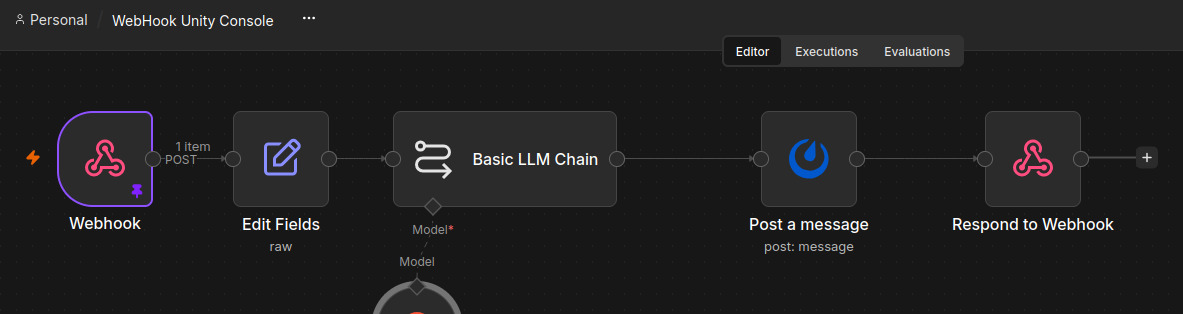
Json, PlainText and File send the same fields under the
same names, so a workflow reads them the same way whichever it gets. The request is a POST.
Json
{
  "format": "mirage-console-webhook/1",
  "kind": "log",
  "source": "All Messages",
  "taken_at": "2026-09-27T14:03:22+02:00",
  "project": "Space Game",
  "project_version": "1.4.2",
  "unity_version": "2022.3.20f1",
  "platform": "Android",
  "build": "Development Build",
  "console_version": "1.0.0",
  "package": "fr.mirageinteractive.console",
  "description": "The boss doesn't spawn",
  "file_name": "console-log-2026-09-27-14-03.txt",
  "line_count": 2,
  "counts": { "log": 1, "warning": 0, "error": 1 },
  "lines": [
    { "time": "2026-09-27T14:03:21.004+02:00", "severity": "log", "tags": ["Boss"], "text": "[Boss] cutscene over" },
    { "time": "2026-09-27T14:03:22.517+02:00", "severity": "error", "tags": ["Net"], "text": "[Net] timeout" }
  ],
  "log": "[14:03:21:004] [Boss] cutscene over\n[14:03:22:517] [Net] timeout"
}
Every field is always there, "" when it has no value. With counts and lines,
a workflow can act on the log without reading its text: open a ticket when counts.error is above 0,
forward what is tagged Net to the network team.
PlainText and File
A multipart/form-data form with the fields that have a value (a form field can't be empty: no
description when nothing was written), then the log: as text in log for
PlainText, as the file file for File.
The fields
| Field | Value |
|---|---|
format | mirage-console-webhook/1: the version of these fields |
kind | log, or profiling for a recording |
source | The tab: All Messages, CLI, Commands or Profiling |
taken_at | When Send was pressed, ISO 8601 with the offset from UTC: 2026-09-27T14:03:22+02:00 |
project, project_version | The product name and version of the game (Player Settings) |
unity_version | The version of Unity |
platform | Where the game runs: Android, WindowsPlayer, WindowsEditor... |
build | Editor, Development Build or Release |
console_version, package | The version and id of Mirage Console |
description | The message written before sending |
file_name | The name of the log as a file: console-log-2026-09-27-14-03.txt |
line_count | How many lines were sent (a number in JSON) |
Authentication
To keep strangers from posting to your endpoint, check Secure with Auth Header and fill in Auth Header Name and Auth Header Value. The header is added to every request, whatever the payload.
- For an n8n Header Auth credential: its name (for instance
X-API-Key) and its value. - For a bearer token:
AuthorizationandBearer your-token. - The value is hidden as you type it and is never logged.
- A header that can't be sent (a missing name or value, a character a header can't hold, a header the request sets itself like
Content-Type) is shown as an error under the fields, and nothing is sent.
Sending and its outcome
- While a log is on its way, the Send button is disabled: it can't be sent twice.
- A send that gets no answer is given up after 20 seconds.
- The console logs the outcome:
Log sent successfully., or the error with the reason the server gave. The URL is never logged.
Security
- Use an
https://URL. A plainhttp://one sends the log unencrypted, and iOS and Android block it by default: the settings page warns you. - The URL and the header are stored in the settings asset, which goes into every build where the console is active. Anyone who takes such a build apart can read them: don't put a secret in a build you distribute publicly.
- Logs may hold personal data. See Data and privacy.